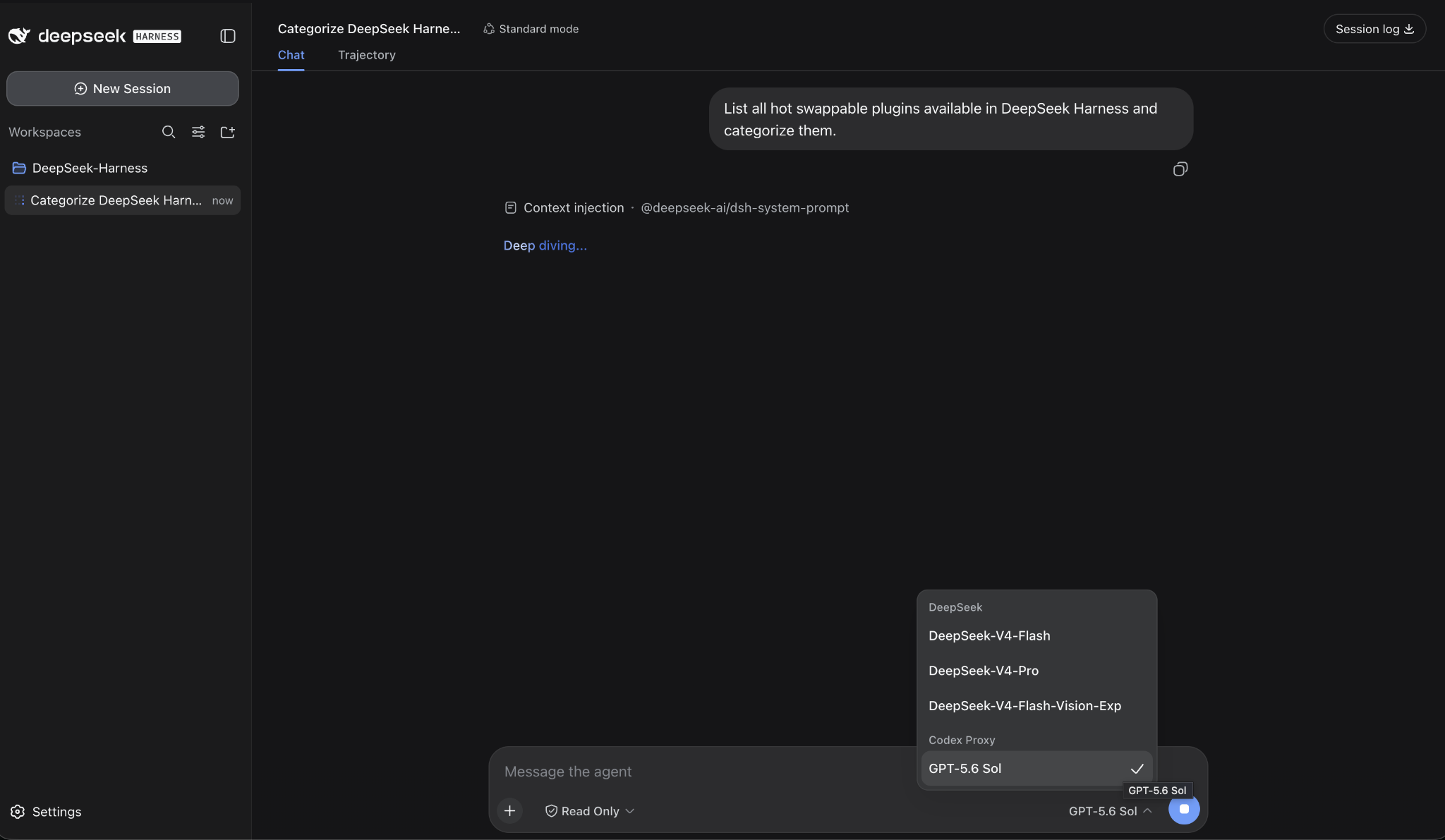
DeepSeek Harness is designed around interchangeable model providers and an extensible plugin architecture. Normally, connecting a commercial cloud model means supplying an API key—traditional Bring Your Own Key (BYOK).
But that is not the only possible architecture.
If a provider already gives you an authenticated CLI, desktop runtime, OAuth session, or subscription-backed local service, you can place an OpenAI-compatible proxy between that runtime and DeepSeek Harness.
For this tutorial, I will demonstrate the pattern using OpenAI Codex + GPT-5.6 Sol.
At the time of writing, DeepSeek Harness is also actively developing native authorization flows for OAuth-capable providers, including infrastructure that can support Codex directly. The proxy approach shown here is useful because it demonstrates the more general architecture and works independently of that rapidly evolving integration surface.
Architecture
We want to create this path:
DeepSeek Harness
       │
       │ OpenAI-compatible HTTP
       ▼
Local Codex Proxy
       │
       │ Codex app-server
       ▼
Official Codex Runtime
       │
       │ OAuth
       ▼
ChatGPT / Codex Subscription
       │
       ▼
GPT-5.6 Sol
DeepSeek Harness therefore does not need to understand Codex OAuth itself. It simply sees another OpenAI-compatible model endpoint.
The proxy used here delegates authentication to the official Codex runtime rather than copying or managing your Codex OAuth tokens itself.
1. Install DeepSeek Harness
If you do not already have Harness running, the simplest local launch is:
npx @deepseek-ai/dsh webThe Web UI runs locally on port 3080 by default.
DeepSeek Harness is currently in developer preview, so expect its configuration and extension APIs to continue changing.
2. Install the official Codex CLI
Install or update Codex:
npm install -g @openai/codex@latestThen authenticate:
codex loginCodex opens the official authentication flow and associates the CLI with your ChatGPT/Codex account.
OpenAI currently requires Codex CLI 0.144.0 or newer for GPT-5.6 access, and availability of Sol depends on your account and rollout status.
You can confirm your version with:
codex --version3. Verify GPT-5.6 Sol first
Before involving Harness or the proxy, make sure the model works directly through Codex:
codex exec \
  --model gpt-5.6-sol \
  --sandbox read-only \
  --ephemeral \
  --skip-git-repo-check \
  "Reply exactly: SOL_OK"
You should receive:
SOL_OKIf this fails, fix the Codex authentication or model-access issue first.
The model identifier currently used by Codex is gpt-5.6-sol, and recent Codex clients can execute it directly when the account has access.
4. Install codex-proxy
For this example we will use the open-source codex-proxy project.
If you have GitHub CLI installed:
gh repo clone mehdic/codex-proxy
cd codex-proxy
Then install and build it:
npm install
npm run build
codex-proxy wraps the official codex app-server and exposes OpenAI-style endpoints including:
/v1/chat/completions
/v1/responses
/v1/models
By default it binds only to 127.0.0.1:3466, which is exactly what we want for a local integration.
5. Start the proxy with GPT-5.6 Sol
Start it with Sol as the default and pre-warmed model:
CODEX_PROXY_DEFAULT_MODEL=gpt-5.6-sol \
CODEX_PROXY_PREWARM_MODELS=gpt-5.6-sol \
npm start
Your OpenAI-compatible base endpoint is now:
http://127.0.0.1:3466/v1The proxy's public model catalog may lag behind the newest Codex models, but it passes requested model names through to codex app-server. Therefore we can manually configure gpt-5.6-sol in Harness when necessary.
6. Keep it alive with tmux
If you close the terminal running the proxy, the process will normally stop.
A simple solution is to run it inside tmux.
On macOS:
brew install tmuxCreate a dedicated session:
tmux new -s codex-proxyThen start the proxy inside that session:
cd codex-proxy

CODEX_PROXY_DEFAULT_MODEL=gpt-5.6-sol \
CODEX_PROXY_PREWARM_MODELS=gpt-5.6-sol \
npm start
Detach from the session with:
Ctrl+B
D
The proxy continues running. Later, reconnect with:
tmux attach -t codex-proxyThis is particularly useful for long-running Harness agent sessions or remote development machines.
7. Verify the proxy
First check its health:
curl http://127.0.0.1:3466/healthThen make an actual model request:
curl http://127.0.0.1:3466/v1/chat/completions \
  -H "Content-Type: application/json" \
  -d '{
    "model": "gpt-5.6-sol",
    "messages": [
      {
        "role": "user",
        "content": "Reply exactly: SOL_PROXY_OK"
      }
    ]
  }'
You should receive a normal OpenAI-compatible response containing SOL_PROXY_OK.
At this point the entire lower half of the architecture works:
HTTP Request
    ↓
codex-proxy
    ↓
Codex app-server
    ↓
Codex OAuth
    ↓
GPT-5.6 Sol
8. Connect the proxy to DeepSeek Harness
Now open DeepSeek Harness → Settings → Models → Add a custom provider.
Harness officially supports custom providers using a provider ID, base URL, API protocol, credential and model catalog.
Configure:
Provider ID:
codex-proxy

Base URL:
http://127.0.0.1:3466/v1

Protocol:
openai-completions

Model:
gpt-5.6-sol
If Harness requires a credential value, use a local placeholder such as:
localThis is not an OpenAI API key.
The authentication chain still lives here:
Codex CLI
   ↓
Codex OAuth
   ↓
ChatGPT account
Rather than here:
DeepSeek Harness
   ↓
OPENAI_API_KEY
If /v1/models does not advertise Sol yet, simply enter gpt-5.6-sol manually in the Harness model catalog. Harness explicitly supports manually declared models for custom providers.
9. Select GPT-5.6 Sol in Harness
After saving the provider, return to a Harness session and select:
codex-proxy / gpt-5.6-solSend a simple test:
Explain which model provider you are using and return the text HARNESS_SOL_OK.The complete request path is now:
DeepSeek Harness Agent
          │
          ▼
codex-proxy
          │
          ▼
Codex app-server
          │
          ▼
Codex OAuth Session
          │
          ▼
GPT-5.6 Sol
You have effectively turned an authenticated cloud-model runtime into a model provider that DeepSeek Harness can consume.
Security: keep the proxy local
Do not casually expose port 3466 to your LAN or the public Internet.
codex-proxy deliberately binds to 127.0.0.1 by default and delegates authentication to your existing Codex session. Its own documentation specifically recommends keeping the service private because Codex is an agent runtime, not merely a text-generation endpoint.
For a local workstation, keep:
CODEX_PROXY_HOST=127.0.0.1Also remember that the proxy exposes Codex-native capabilities according to its configured sandbox policy. Its conservative default is read-only; use broader filesystem or shell permissions only when you understand the consequences.
Why DeepSeek Harness makes this interesting
Getting GPT-5.6 Sol to answer inside another UI is not the interesting part.
The interesting part is what DeepSeek Harness can place around the model.
DeepSeek Harness is built on Cordis around the principle:
Everything is a Plugin.
The model adapter, tool registry, filesystem access, session system and even the agent loop itself are implemented as replaceable plugins rather than one fixed agent architecture.
That means your cloud model can become only one component of a larger programmable environment:
                    GPT-5.6 Sol
                         │
                         ▼
                 DeepSeek Harness
                         │
          ┌──────────────┼──────────────┐
          ▼              ▼              ▼
        Skills           MCP           Tools
          │              │              │
          ▼              ▼              ▼
       Context         Services       Systems
          │              │              │
          └──────────────┼──────────────┘
                         ▼
                  Plugin Runtime
                         │
           ┌─────────────┼─────────────┐
           ▼             ▼             ▼
        Memory        Policies      Sandboxes
           │             │             │
           └─────────────┼─────────────┘
                         ▼
                 Agent Execution
                         │
                         ▼
              Sub-agents / Delegation
Harness currently exposes extension points for custom tools, MCP servers, Skills, memory, model adapters, sandbox backends, permissions, hooks, scheduled jobs, UI integrations and sub-agent providers. Sub-agent delegation can target other Harness agents as well as external runtimes such as Codex and Claude Code.
And because the architecture itself is plugin-based, you are not limited to the capabilities DeepSeek ships.
You can build your own:
dsh-pluginThen register new tools, providers, workflows, model adapters or entirely new agent behaviors through the same runtime. DeepSeek even recommends the dsh-plugin GitHub topic for community plugin discovery.
So the bigger idea is not:
How do I run GPT-5.6 Sol in DeepSeek Harness?
It is:
How do I turn the cloud models I already use into interchangeable reasoning engines inside an open, programmable agent runtime?
Codex + GPT-5.6 Sol is only the first demonstration.
The next interesting step is combining these models with Harness plugins, MCP, Skills, specialized tools, memory and sub-agents to build purpose-specific agent systems rather than another standalone AI chat interface.