AI coding agents become much more useful when they can continue working without requiring you to sit in front of the computer.
A refactor might take twenty minutes. A test suite might run much longer. One agent may be implementing a feature while another reviews changes, a third investigates an unrelated bug, and another waits for a decision before proceeding.
Most of this work does not require continuous human attention.
What it does require is coordination, persistence and a clear place to supervise everything.
That changes the role of the development machine.
Instead of being the place where I constantly watch an AI agent work, my MacBook becomes the execution environment. Herdr becomes the persistent control layer around the project, while my phone provides an optional remote interface whenever I am away from the desk.
The basic setup is deliberately small:
iPhone
├── Tailscale
└── Termius
      │
      │ SSH
      ▼
MacBook Air
├── Tailscale
├── macOS Remote Login
└── Herdr
    ├── Coordinator
    ├── Claude Code
    ├── Codex
    ├── Reviewer
    ├── tests
    └── development processes
There is no public SSH endpoint, no VPS, no Docker container and no additional server.
The MacBook runs the development workload. Herdr organizes the active project and its agents. Tailscale provides private connectivity between my devices. Termius gives the iPhone a terminal into the same environment.
The mobile part is useful, but it is only one piece of the idea.
The more interesting part is building a persistent multi-agent development workspace in which several specialized agents can work in parallel with limited supervision.
Why these tools?
Each component solves a different problem.
Tailscale — the private network
Tailscale creates a private network, called a tailnet, between authenticated devices.
Once my iPhone and MacBook are signed into the same tailnet, the Mac receives a stable Tailscale IP address.
This means I do not need to:
- expose SSH to the public internet,
- configure router port forwarding,
- know my home public IP,
- operate a traditional VPN server.
For this setup, I use normal macOS SSH over the Tailscale network.
Termius — the terminal in my pocket
Termius is the SSH client on the iPhone.
It connects to the MacBook using:
Tailscale IP
+
macOS username
+
SSH authentication
Once connected, I have a normal shell on the Mac.
Termius is not running Claude, Codex or Herdr on the phone. It is only providing an interface to processes actually executing on the MacBook.
The phone therefore acts as a control surface, rather than another development machine.
Herdr — the actual control layer
Herdr is the component that makes this architecture more useful than a collection of ordinary SSH terminals.
It provides a persistent terminal environment where shells, coding agents, test runners, servers and other processes can be grouped into project workspaces.
A simple project might look like this:
Project
│
├── Claude Code
├── Codex
├── test runner
├── development server
└── logs
But the same structure can evolve into something more interesting:
Project
│
├── Coordinator
│
├── Feature Agent
├── Backend Agent
├── Reviewer
├── Integration Agent
│
├── tests
├── application server
└── logs
Instead of treating every coding agent as an isolated chat or terminal process, the project itself becomes the unit of organization.
Herdr also keeps its terminal processes behind a background server.
Closing or detaching the visible interface therefore does not automatically terminate everything running inside the workspace.
That persistence is valuable locally.
It also makes remote supervision practical.
Why Herdr is useful even without the phone
The mobile workflow is convenient, but it is not the primary benefit.
The bigger advantage is that Herdr gives structure to parallel agentic development.
Without a control layer, the environment can quickly become fragmented:
Terminal 1 → Claude
Terminal 2 → Codex
Terminal 3 → tests
Terminal 4 → application server
Terminal 5 → logs
Terminal 6 → second Claude session
Terminal 7 → another repository
Each process may be useful individually, but understanding the state of the overall project becomes increasingly difficult.
Herdr allows those processes to be organized around the work they belong to.
For example:
Workspace: Product

├── Coordinator
│
├── Implementation
│   └── Claude Code
│
├── Review
│   └── Codex
│
├── Verification
│   └── tests
│
├── Runtime
│   └── development server
│
└── Observability
    └── logs
This changes the workflow from operating individual agents to supervising a small development system.
Parallel agents: isolate the work first
Running several agents in parallel can increase throughput considerably, but only when they are not blindly modifying the same working directory.
A good rule is:
For independent tasks that modify code, a strong default is one agent → one Git worktree → one branch.
For example:
Repository
│
├── main
│
├── worktree/api-auth
│   └── Agent A
│
├── worktree/frontend
│   └── Agent B
│
├── worktree/cache-fix
│   └── Agent C
│
└── worktree/review
    └── Reviewer
Git worktrees allow multiple working directories to exist from the same repository while keeping their checked-out branches separate.
Herdr can then provide the shared control surface across those environments.
Conceptually:
                         HERDR
                           │
        ┌──────────────────┼──────────────────┐
        │                  │                  │
        ▼                  ▼                  ▼
   Worktree A         Worktree B         Worktree C
        │                  │                  │
     Agent A            Agent B            Agent C
        │                  │                  │
   API feature          frontend          bug fix
Each worker owns a clearly scoped task.
This is safer and easier to reason about than letting several autonomous coding agents edit the same files simultaneously.
Add a coordinator agent
Once several workers operate in parallel, another problem appears:
Who decides what each agent should work on?
This is where a coordinator or supervisor agent becomes useful.
Instead of implementing features itself, the coordinator maintains the shared plan.
Its responsibilities can include:
Coordinator

├── understand the objective
├── decompose it into tasks
├── determine dependencies
├── assign tasks to workers
├── select appropriate worktrees
├── monitor progress
├── detect blocked workers
├── avoid duplicated work
├── request review
└── decide when integration should begin
The coordinator should generally avoid becoming another worker unless necessary. Its value comes from maintaining the global view of the project.
Herdr can support this pattern through its agent-automation primitives: scripts—or another agent—can start named agents, prompt them, inspect their terminal output and lifecycle state, wait for them to settle, and collect their results. The coordinator role is therefore a workflow you explicitly build on top of Herdr; it is not created automatically merely by putting several agents in the same workspace.
Workers report upward
A useful architecture is to route worker status and results back through the coordinator rather than having workers continuously coordinate among themselves. In practice, this reporting must be implemented explicitly—for example with Herdr agent automation, a shared task file, or an external task/orchestration layer.
For example:
                   Human
                     │
                     ▼
               Coordinator
                     │
       ┌─────────────┼─────────────┐
       │             │             │
       ▼             ▼             ▼
   Backend Agent  UI Agent    Data Agent
       │             │             │
       └─────── status/results ────┘
                     │
                     ▼
               Coordinator
The coordinator maintains:
- the current objective,
- outstanding tasks,
- dependencies,
- completed work,
- blocked work,
- integration status.
This helps prevent a common failure mode in multi-agent systems: several agents independently solving the same problem or making incompatible assumptions.
The workers can stay focused on their assigned context.
The coordinator maintains the project-level context.
Add an independent reviewer
Implementation and evaluation should preferably not be the same role.
After a worker completes a task, a dedicated reviewer can inspect its branch or diff.
For example:
Worker Agent
    │
    │ implementation complete
    ▼
Reviewer Agent
    │
    ├── inspect diff
    ├── check correctness
    ├── inspect edge cases
    ├── evaluate tests
    ├── identify regressions
    └── report findings
The reviewer might receive an instruction such as:
Review the implementation.

Do not modify it yet.

Check:
- correctness
- concurrency
- error handling
- edge cases
- missing tests
- security implications
- unnecessary complexity
Separating generation from evaluation gives the second agent a different objective and helps avoid simply continuing the assumptions of the original implementation.
Use an integration agent for the final step
When several parallel branches are ready, a separate integration role can become useful.
Its job is not primarily to build new features.
Instead it can:
Integration Agent

├── inspect completed branches
├── compare diffs
├── identify overlapping changes
├── merge approved work
├── resolve straightforward conflicts
├── run the combined test suite
├── verify integration behaviour
└── escalate ambiguous conflicts
This produces a cleaner pipeline:
Coordinator
     │
     ├──── Worker A ────┐
     │                  │
     ├──── Worker B ────┤
     │                  │
     └──── Worker C ────┘
                        │
                        ▼
                     Review
                        │
                        ▼
                   Integration
                        │
                        ▼
                       main
The human remains responsible for final judgment where appropriate, but much of the repetitive comparison, testing and integration work can be delegated.
The resulting agentic development workflow
Putting these components together creates a much more structured workflow.
                         HUMAN
                           │
                    define objective
                           │
                           ▼
                    COORDINATOR
                           │
                  decompose + assign
                           │
       ┌───────────────────┼───────────────────┐
       │                   │                   │
       ▼                   ▼                   ▼
    AGENT A             AGENT B             AGENT C
   Worktree A          Worktree B          Worktree C
       │                   │                   │
 implementation        implementation       analysis
       │                   │                   │
       └────────── status / results ───────────┘
                           │
                           ▼
                       REVIEWER
                           │
                           ▼
                      INTEGRATOR
                           │
                    tests + merge
                           │
                           ▼
                          main
Herdr sits around this entire process:
Herdr Workspace
│
├── Coordinator
│
├── Worker A
│   └── worktree A
│
├── Worker B
│   └── worktree B
│
├── Worker C
│   └── worktree C
│
├── Reviewer
│
├── Integrator
│
├── Tests
├── Dev Server
└── Logs
This is where Herdr starts to look less like a terminal utility and more like a lightweight operational layer for an agentic software team.
Scale further with a task board
With two or three workers, the coordinator can often maintain the task plan itself.
As the number of parallel tasks grows, a structured task or Kanban layer becomes useful.
Instead of workers choosing arbitrary work, tasks can move through states such as:
BACKLOG
   ↓
READY
   ↓
CLAIMED
   ↓
WORKING
   ↓
REVIEW
   ↓
INTEGRATION
   ↓
DONE
Workers claim scoped tasks.
The coordinator monitors the overall queue.
The reviewer handles completed work.
The integration agent handles approved changes.
This reduces the risk of agents inventing duplicate work or stepping on tasks that another worker already owns.
The resulting model starts to resemble a small asynchronous engineering organization rather than a collection of chat sessions.
Parallel work instead of sequential prompting
This is fundamentally different from a traditional AI-assisted workflow:
ask agent
↓
wait
↓
review result
↓
ask next question
↓
wait again
With persistent agents and isolated branches:
                Coordinator
                     │
       ┌─────────────┼─────────────┐
       │             │             │
    Feature A     Feature B      Research
       │             │             │
     Agent         Agent          Agent
       │             │             │
       └─────────────┼─────────────┘
                     │
                   Review
                     │
                  Integration
Independent work proceeds simultaneously.
Human attention can move toward decisions and exceptions rather than constantly feeding the next prompt.
Less context switching
There is also a straightforward human benefit.
When everything belonging to a project lives inside one workspace, I no longer have to constantly remember:
Which terminal had Claude?

Which branch is Codex changing?

Where are the tests running?

Which agent owns the API task?

Did somebody already start the frontend work?

Which branch is waiting for review?

Where is the application server?
The project becomes the unit of organization.
That becomes increasingly important as the number of simultaneous agents grows.
Long-running work becomes normal
Some coding-agent tasks are naturally slow:
- repository-wide refactoring,
- dependency migrations,
- large test suites,
- repeated debugging cycles,
- codebase analysis,
- documentation generation,
- static analysis,
- build pipelines,
- local experiments.
Persistent sessions make it easier to treat these as background work.
A worker can receive something like:
Implement the assigned change.

Stay inside your worktree.

Run the relevant tests.

Fix failures clearly caused by your implementation.

Report completion to the coordinator.

Stop if the public API or shared architecture needs to change.
The human does not need to watch every command.
The objective is not unrestricted autonomy.
The objective is to move from continuous supervision toward exception-based supervision.
Human intervention at decision points
A useful development loop becomes:
objective
   ↓
coordinator creates plan
   ↓
workers execute in parallel
   ↓
tests / review / analysis
   ↓
normal work continues autonomously
   ↓
uncertainty or important decision
   ↓
human intervention
   ↓
work continues
The human remains responsible for important engineering decisions.
But there is little value in watching every routine step execute when the surrounding workflow can handle it safely.
Setting up remote access
Once the local Herdr workflow is useful on its own, adding mobile access is straightforward.
1. Install Tailscale on the MacBook
Install the official Tailscale macOS application.
Open it and sign in.
Then enable its CLI integration:
Tailscale
→ Settings
→ CLI Integration
→ Install
Open Terminal and run:
tailscale ip -4
You should receive something similar to:
<tailscale-ip>
This is the private address the iPhone will use.
2. Enable SSH on macOS
Open:
System Settings
→ General
→ Sharing
→ Remote Login
Enable Remote Login.
Allow your own macOS user.
Then check your username:
whoami
For example:
<macOS-username>
You now need:
Mac username:   <macOS-username>
Tailscale IP:   <tailscale-ip>
3. Install Herdr
On the Mac:
brew install herdr
Verify:
herdr --version
Open your project:
cd ~/Projects/my-project
Then:
herdr
4. Install Tailscale on the iPhone
Install Tailscale from the App Store.
Sign in with the same account as on the Mac.
Allow iOS to create the required VPN configuration.
Once connected, both devices belong to the same private tailnet.
5. Configure Termius
Install Termius on the iPhone.
Create a new SSH host using your own connection details in place of the placeholders below:
Name
<connection-label>

Address
<tailscale-ip>

Port
<ssh-port>

Username
<macOS-username>
Example:
Address: <tailscale-ip>
Port: <ssh-port>
Username: <macOS-username>
For an initial personal setup, normal macOS SSH password authentication can be used if it is enabled on the Mac. An Ed25519 SSH key is preferable for long-term use, and access still depends on your Tailscale policy allowing the iPhone to reach the MacBook on its configured SSH port.
Connect.
You should receive a shell similar to:
<macOS-username>@<mac-hostname> ~ %
Taking the control layer mobile
Once Termius reaches the Mac, run:
herdr
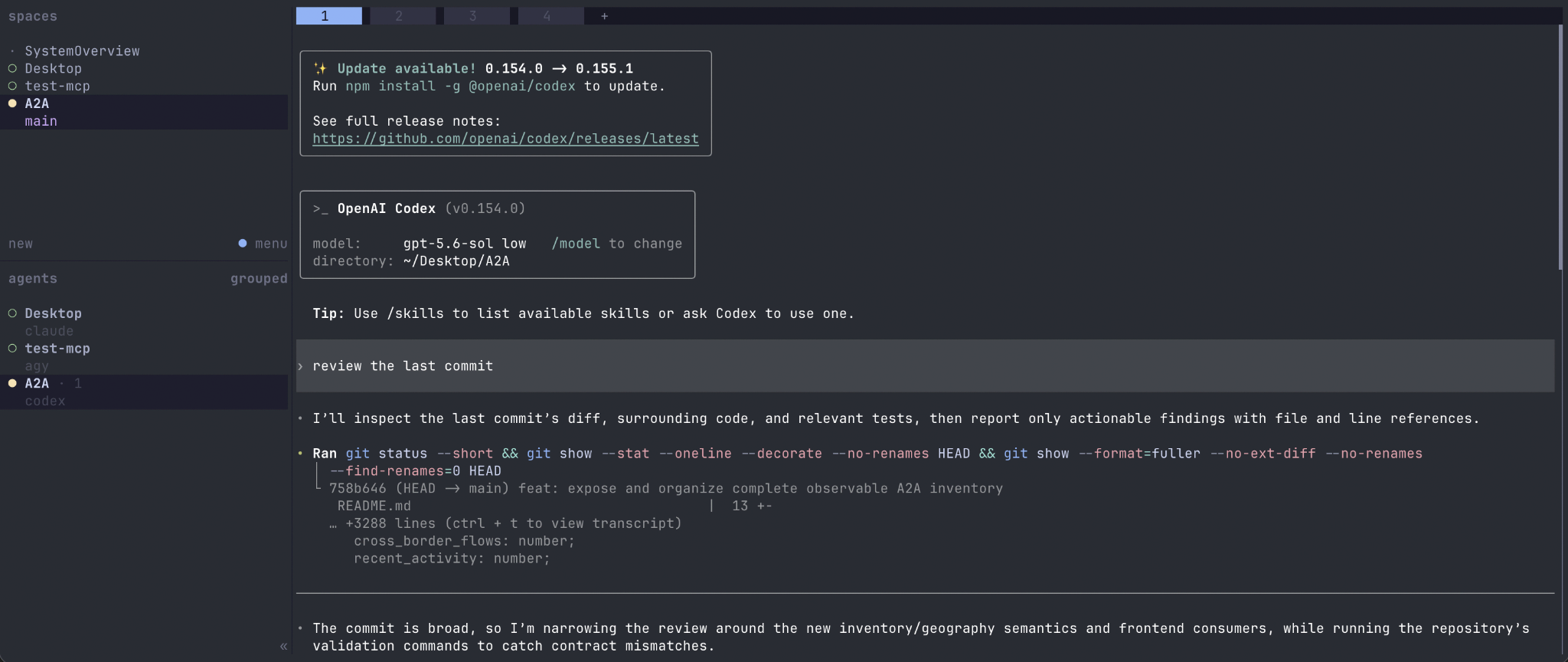
The same Herdr environment appears in the phone terminal.
The path is:
iPhone
   │
   │ Tailscale
   ▼
Termius
   │
   │ SSH
   ▼
MacBook Air
   │
   ▼
Herdr
   │
   ├── Coordinator
   ├── Worker A
   ├── Worker B
   ├── Reviewer
   ├── Integrator
   ├── tests
   └── development server
The iPhone is not another copy of the development environment.
It is simply another interface into the same persistent system running on the Mac.
Persistent sessions are the important part
Herdr's default prefix key is:
Ctrl+B
To detach:
Ctrl+B
q
The client disappears, but the background Herdr server continues running.
That means:
Detach from Herdr
        ↓
agents continue

Close SSH
        ↓
agents continue

Close Termius
        ↓
agents continue

Disconnect the iPhone
        ↓
agents continue
Later:
1. Connect Tailscale
2. Open Termius
3. SSH into the MacBook
4. Run herdr
The existing workspace becomes visible again.
Persistence is not the same as surviving a reboot
There is an important distinction.
Herdr persistence means that the visible client can disappear while its background server and child processes remain alive.
It does not mean that running Unix processes survive:
- shutting down the Mac,
- rebooting macOS,
- stopping the Herdr server,
- losing power.
The workspace structure and supported agent sessions may be recoverable depending on the relevant integrations, but terminated operating-system processes are still terminated.
Keep the Mac awake
The MacBook is doing the actual work, so it must remain awake.
For temporary long-running sessions:
caffeinate -i
Keep the machine:
connected to power
connected to the network
awake
For a genuinely continuous setup, an always-on Mac mini or Linux workstation is a more natural execution host than a laptop.
The rest of the architecture remains almost identical.
Why mobile supervision becomes useful
The phone is not meant to replace the IDE.
Its purpose is to resolve small interruptions without returning to the workstation.
For example, a coordinator might report:
Worker B is blocked.

The requested implementation requires changing
the public API contract.

Proceed?
Or a reviewer may report:
Implementation passed tests.

I found one possible race condition in the cache layer.

Should I send it back to the worker?
A short decision from the phone may allow another hour of work to continue.
This is much more useful than trying to perform substantial software development on a small screen.
The daily workflow
At the desk:
cd ~/Projects/my-project
herdr
The workspace might contain:
Coordinator
    ↓
┌──────────┬──────────┬──────────┐
│ Worker A │ Worker B │ Worker C │
└──────────┴──────────┴──────────┘
           ↓
        Reviewer
           ↓
       Integrator
           ↓
         Tests
Then detach:
Ctrl+B
q
Later from the iPhone:
Tailscale
    ↓
Termius
    ↓
MacBook
    ↓
Herdr
Check the coordinator.
Inspect blocked workers.
Read review results.
Approve or redirect the next action.
Detach again.
Final architecture
                            HUMAN
                              │
                     objectives / decisions
                              │
                              ▼
                        COORDINATOR
                              │
                task planning / assignment
                              │
          ┌───────────────────┼───────────────────┐
          │                   │                   │
          ▼                   ▼                   ▼
       WORKER A            WORKER B            WORKER C
      Worktree A          Worktree B          Worktree C
          │                   │                   │
          └─────────── results / status ──────────┘
                              │
                              ▼
                           REVIEWER
                              │
                              ▼
                          INTEGRATOR
                              │
                       tests / merge
                              │
                              ▼
                             MAIN

              ───── everything supervised in ─────

                            HERDR
                              ▲
                              │
                         MacBook Air
                              ▲
                              │ SSH
                          Tailscale
                              │
                           Termius
                              │
                            iPhone
The responsibilities remain clean.
The coordinator maintains the global plan.
Workers execute scoped tasks in isolated worktrees.
The reviewer independently evaluates completed work.
The integration agent combines approved changes and verifies the result.
Herdr exposes the entire development environment as one persistent control surface.
The MacBook supplies the repository, tools and compute.
Tailscale and Termius extend that control surface to the phone.
Closing thought
AI coding agents are becoming most useful when they can work in parallel, stay organized, and continue without constant supervision. The real challenge is no longer just getting an agent to write code, but creating a workflow where multiple agents can collaborate safely and predictably. Persistent sessions, clear roles, isolated workspaces, review, and lightweight human oversight make that possible. Remote access is simply an extra layer that lets the same system stay useful wherever you are. The result is a more practical way to develop software with AI: less babysitting, more coordination, and better use of human attention.
References
Documentation checked September 2026.
Herdr
- Herdr Documentation
- Installation
- Quick Start
- How to Work with Herdr
- Agents
- Agent Automation
- Persistence and Remote Access
- Session State and Restore
- Connecting Machines
- Hermes Agent: Kanban Worker Lanes — example of an optional external task-orchestration layer
Tailscale
- Install Tailscale on macOS
- Install Tailscale on iOS
- Tailscale IP Addresses
- SSH over Tailscale
- Tailscale CLI
Apple
Termius
Git